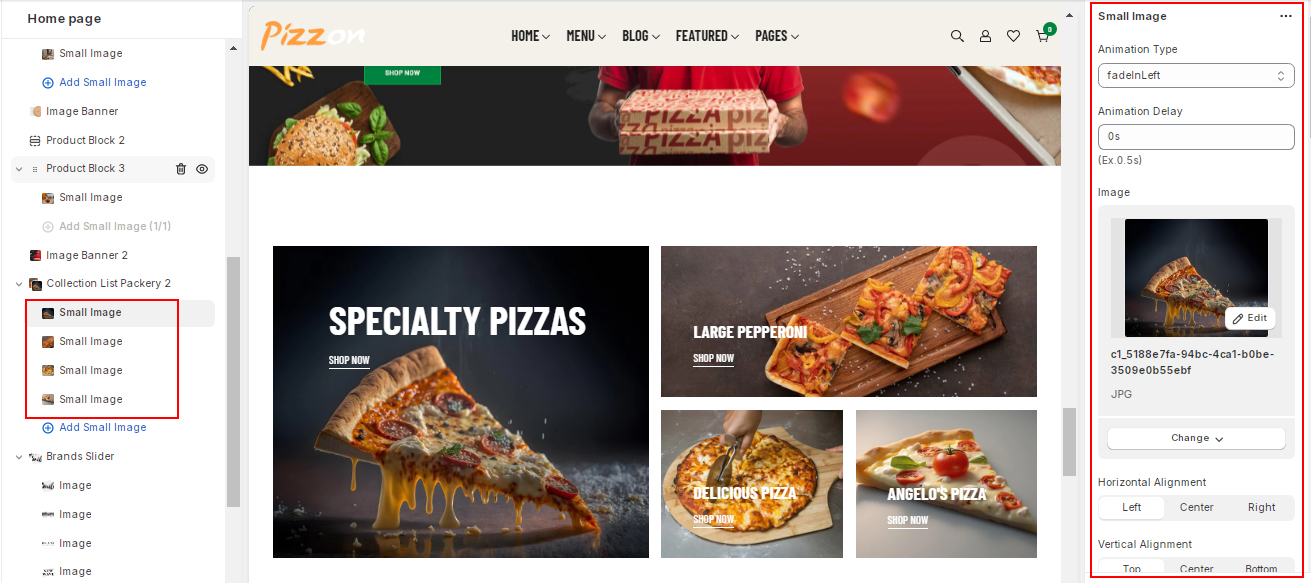
> For the complete documentation index, see [llms.txt](https://templatescoder.gitbook.io/pizzon-shopify-theme-documentation/llms.txt). Markdown versions of documentation pages are available by appending `.md` to page URLs; this page is available as [Markdown](https://templatescoder.gitbook.io/pizzon-shopify-theme-documentation/all-sections-in-theme/collection-list-packery-2.md).
# Collection List Packery 2
To add this section, please follow below steps:
{% hint style="success" %}
**Steps:**
1. From your Shopify admin, go to **Online Store -> Themes**.
2. Find the theme that you want to edit, and then click **Customize**.
3. Click **Add section** and choose **"Collection List Packery 2"**.
{% endhint %}
#### **1. Section Setting**
| Setting | Description |
| ------------------------------------------------------- | --------------------------------------------------------------------------------------------------------------------------------------------- |
| Layout | Select the layout width of the whole section. The options are: Default (same as the body width), Full Width (the 100% of the viewport width). |
| Spacing Top / Spacing Bottom on Desktop, Tablet, Mobile | Determine the spacing of the section from its top and bottom sections on Desktop, Tablet and Mobile separately. |
| Grid Space | Determine the spacing of the Collection Box. |
#### **2. Block Settings**
| Setting | Description |
| ----------------------------------------------- | ---------------------------------------------------------------------------------------------------------------------- |
| Animation Type | Select Section Animation. |
| Alignment | Select Content Horizontal and Vertical Alignment. |
| Padding | Set Content left, right, top, bottom Padding. |
| Content: Max Width | Set Content Max Width. |
| Title | Enter the title for the section. |
| Title Font Size on Desktop, Tablet, Mobile | Determine the font size of the title on Desktop, Tablet and Mobile separately. |
| Line Height | Determine the Line Height of the title on Desktop, Tablet and Mobile separately. |
| Title Font Weight | Select the font weight of the title to be either Extra Light, Light, Normal, Medium, Semi Bold, Bold, Bolder or Black. |
| Title text transform | Select the text transform of the title to be either uppercase, lowercase, capitalize, none. |
| Title Letter Spacing | Enter the letter spacing for the title. |
| Title Color | Set the color for the subtitle. |
| Title Spacing Bottom on Desktop, Tablet, Mobile | Determine the spacing of the title from bottom on Desktop, Tablet and Mobile separately. |
| Button | Set button text, link, Font Size, Line Height, Font Weight, Letter Spacing, Text Transform, Buttom Border and Color |