> For the complete documentation index, see [llms.txt](https://templatescoder.gitbook.io/labacha-shopify-theme-documentation/llms.txt). Markdown versions of documentation pages are available by appending `.md` to page URLs; this page is available as [Markdown](https://templatescoder.gitbook.io/labacha-shopify-theme-documentation/theme-settings/recently-viewed.md).
# Recently Viewed
Social Media allows adding social media links to your site.
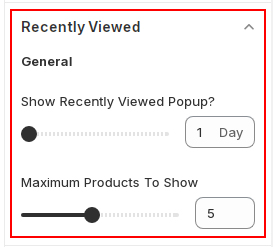
With this section, customer easily finds their previously viewed products and it improves the conversion rate for the store. In this section, the list comes of recently viewed products.
{% hint style="success" %}
**Steps:**
1. From your Shopify admin, go to **Online Store -> Themes**.
2. Find the theme that you want to edit, and then click **Customize**.
3. Click **Theme settings -> Recently Viewed**.
{% endhint %}
Setting
Description
Show Recently Viewed Popup? (Range slider)
Determine the timespan within which the products being seen are included in the Recently Viewed items list.