> For the complete documentation index, see [llms.txt](https://templatescoder.gitbook.io/labacha-shopify-theme-documentation/llms.txt). Markdown versions of documentation pages are available by appending `.md` to page URLs; this page is available as [Markdown](https://templatescoder.gitbook.io/labacha-shopify-theme-documentation/theme-settings/general/trust-image.md).

# Trust Image

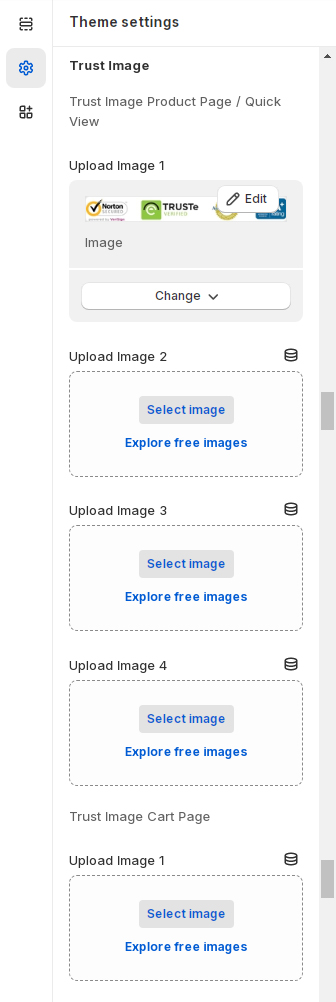
**Trust Image** shows custom images on Product Page, Quick View and Cart Page.

1. From your Shopify admin, go to **Online Store** **->** **Themes**.
2. Find the theme that you want to edit, and then click **Customize**.
3. Click **Theme settings -> General -> Trusted image.**

<figure><img src="https://content.gitbook.com/content/99MlOzvyJDAhsvR2FLtv/blobs/XJmXd6a3fK8VSBz8H3rS/screenshort-185.jpg" alt=""><figcaption></figcaption></figure>

<table><thead><tr><th width="320">Setting</th><th>Description</th></tr></thead><tbody><tr><td><strong>Product page/Quick view</strong>: Image 1</td><td>Upload an image to use as the trusted image 1 on product page/quick view.</td></tr><tr><td><strong>Product page/Quick view</strong>: Image 2</td><td>Upload an image to use as the trusted image 2 on product page/quick view.</td></tr><tr><td><strong>Product page/Quick view</strong>: Image 3</td><td>Upload an image to use as the trusted image 3 on product page/quick view.</td></tr><tr><td><strong>Product page/Quick view</strong>: Image 4</td><td>Upload an image to use as the trusted image 4 on product page/quick view.</td></tr><tr><td><strong>Cart page</strong>: Image 1</td><td>Upload an image to use as the trusted image 1 on cart page.</td></tr><tr><td><strong>Cart page</strong>: Image 2</td><td>Upload an image to use as the trusted image 2 on cart page.</td></tr><tr><td><strong>Cart page</strong>: Image 3</td><td>Upload an image to use as the trusted image 3 on cart page.</td></tr><tr><td><strong>Cart page</strong>: Image 4</td><td>Upload an image to use as the trusted image 4 on cart page.</td></tr><tr><td><strong>Cart page</strong>: Image 5</td><td>Upload an image to use as the trusted image 5 on cart page.</td></tr><tr><td><strong>Cart page</strong>: Image 6</td><td>Upload an image to use as the trusted image 6 on cart page.</td></tr></tbody></table>