> For the complete documentation index, see [llms.txt](https://templatescoder.gitbook.io/labacha-shopify-theme-documentation/llms.txt). Markdown versions of documentation pages are available by appending `.md` to page URLs; this page is available as [Markdown](https://templatescoder.gitbook.io/labacha-shopify-theme-documentation/theme-settings/general/terms-and-conditions.md).

# Terms and conditions

A "**I agree with Terms & Conditions**" checkbox is a **method of protecting your business** by requiring that users acknowledge the rules they must abide by when using your services.

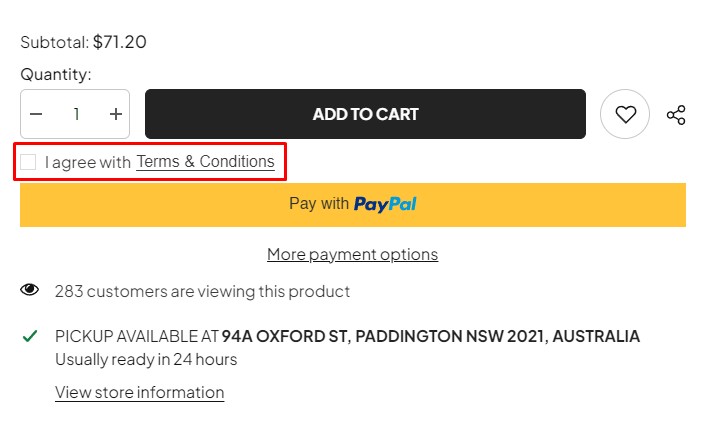
<figure><img src="https://content.gitbook.com/content/99MlOzvyJDAhsvR2FLtv/blobs/co3lY26opwAkQ4vFCMXu/9.jpg" alt=""><figcaption><p>Terms And Conditions checkbox on product page</p></figcaption></figure>

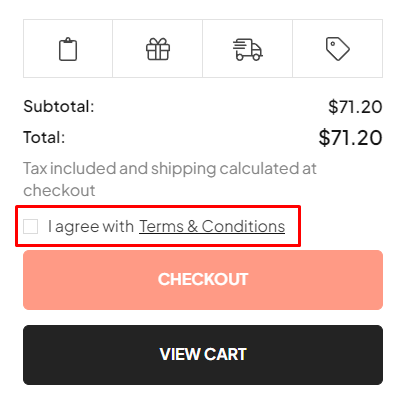
<figure><img src="https://content.gitbook.com/content/99MlOzvyJDAhsvR2FLtv/blobs/CZseJT6O93nKTXwtx8qP/11.jpg" alt=""><figcaption><p>Terms And Conditions checkbox on side cart</p></figcaption></figure>

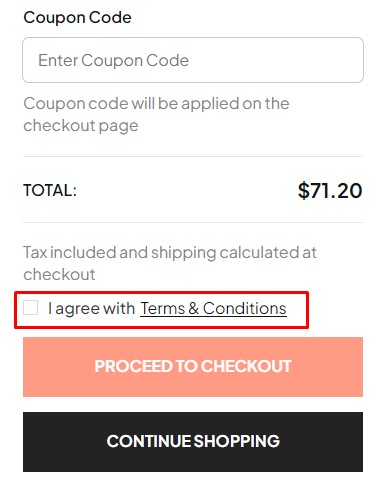
<figure><img src="https://content.gitbook.com/content/99MlOzvyJDAhsvR2FLtv/blobs/JwqbpuRnGMGESagPhYF9/10.png" alt=""><figcaption><p>Terms And Conditions checkbox on cart page</p></figcaption></figure>

1. From your Shopify admin, go to **Online Store** **->** **Themes**.
2. Find the theme that you want to edit, and then click **Customize**.
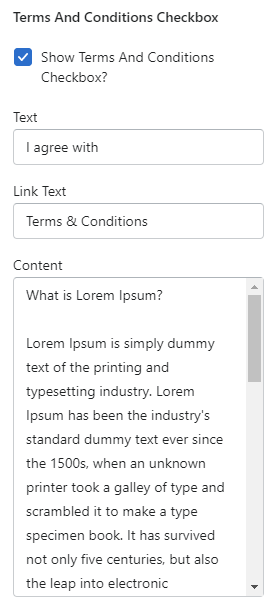
3. Click **Theme settings -> General -> Terms and conditions**.

<figure><img src="https://content.gitbook.com/content/99MlOzvyJDAhsvR2FLtv/blobs/h45dhPHvPPTFHFFYNRKf/screenshort-10.png" alt=""><figcaption></figcaption></figure>

<table><thead><tr><th width="251">Setting</th><th>Description</th></tr></thead><tbody><tr><td>Show terms and conditions</td><td>Display a '<strong>I agree with Terms &#x26; Conditions'</strong> checkbox on product page, side cart and cart page.</td></tr><tr><td>Text</td><td><p>Enter the text for the checkbox.</p><p>Example: <strong>I agree with</strong></p></td></tr><tr><td>Link Text</td><td><p>The text that displays on the button. Click this button to show a popup.</p><p>Example: Terms &#x26; Conditions</p></td></tr><tr><td>Content</td><td>Display the content regarding Terms &#x26; Conditions in the popup.</td></tr></tbody></table>