> For the complete documentation index, see [llms.txt](https://templatescoder.gitbook.io/labacha-shopify-theme-documentation/llms.txt). Markdown versions of documentation pages are available by appending `.md` to page URLs; this page is available as [Markdown](https://templatescoder.gitbook.io/labacha-shopify-theme-documentation/other/wishlist-page.md).
# Wishlist Page
A wishlist page is a fantastic way for shoppers to save things they might be interested in buying later. It can increase visitors’ engagement by giving shoppers a way to easily keep track of products they want to buy.
{% hint style="success" %}
**Steps:**
1. From your Shopify admin, go to **Online Store** **->** **Pages.**
2. Click **Add page**.
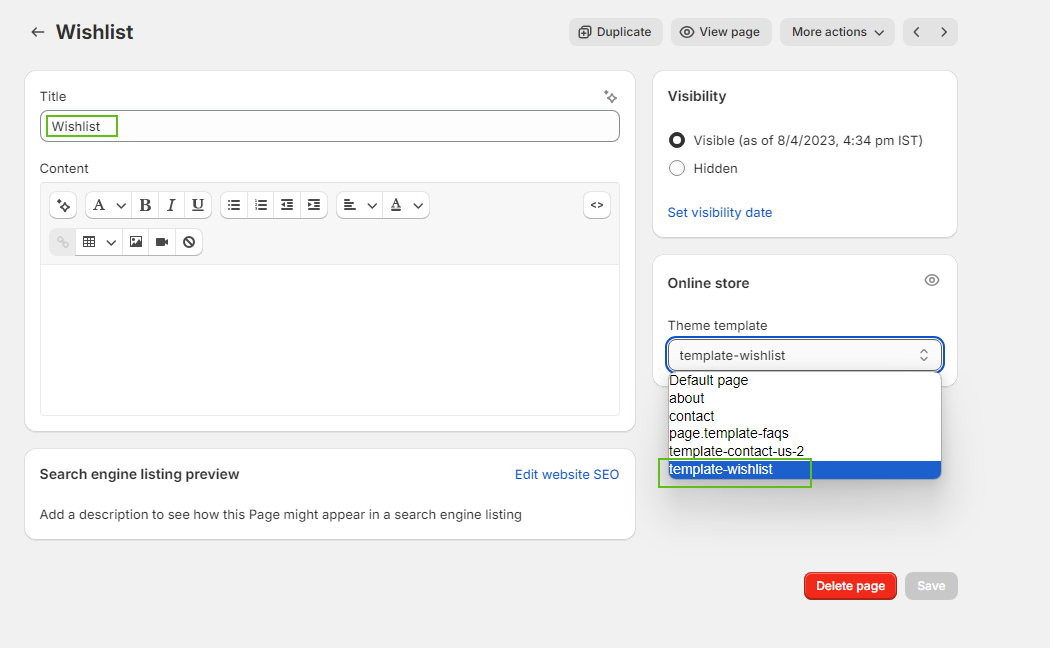
3. Enter a title (ex: **Wishlist**). After that, choose the **Theme template** look like the below image.
4. Click **Save**.
{% endhint %}
{% hint style="danger" %}
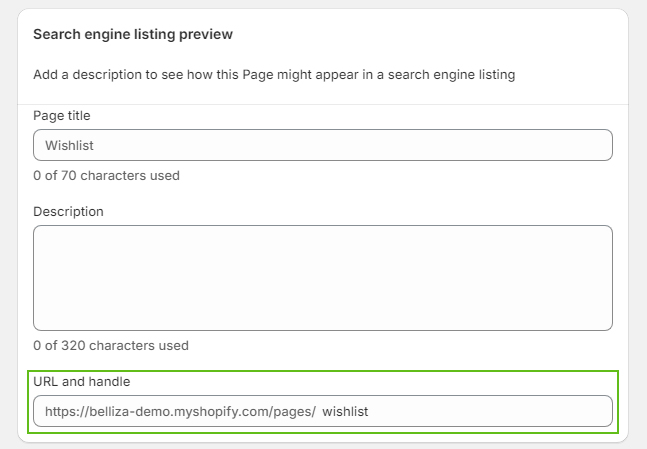
Your page URL must be: **/pages/wishlist.**
{% endhint %}
### 1. How to set up sections for Wishlist Page?
{% hint style="success" %}
**Steps:**
1. From your Shopify admin, go to **Online Store** **->** **Themes**.
2. Find the theme that you want to edit, and then click **Customize**.
3. Choose **Pages** from the dropdown window **->** Choose **template-wishlist**
{% endhint %}