> For the complete documentation index, see [llms.txt](https://templatescoder.gitbook.io/labacha-shopify-theme-documentation/llms.txt). Markdown versions of documentation pages are available by appending `.md` to page URLs; this page is available as [Markdown](https://templatescoder.gitbook.io/labacha-shopify-theme-documentation/collection-and-product/collection.md).
# Collection
{% hint style="success" %}
**Steps:**
1. From your Shopify admin, go to **Online Store -> Themes**.
2. Find the theme that you want to edit, and then click **Customize**.
3. Choose **Collection** from the dropdown window.
{% endhint %}
### 1. Collection Header
In Collection Header, you can set up for Collection Image and Collection Description
1. Upload one image for all collections: You can upload it right in theme editor. Please choose **Collection Image** as below:
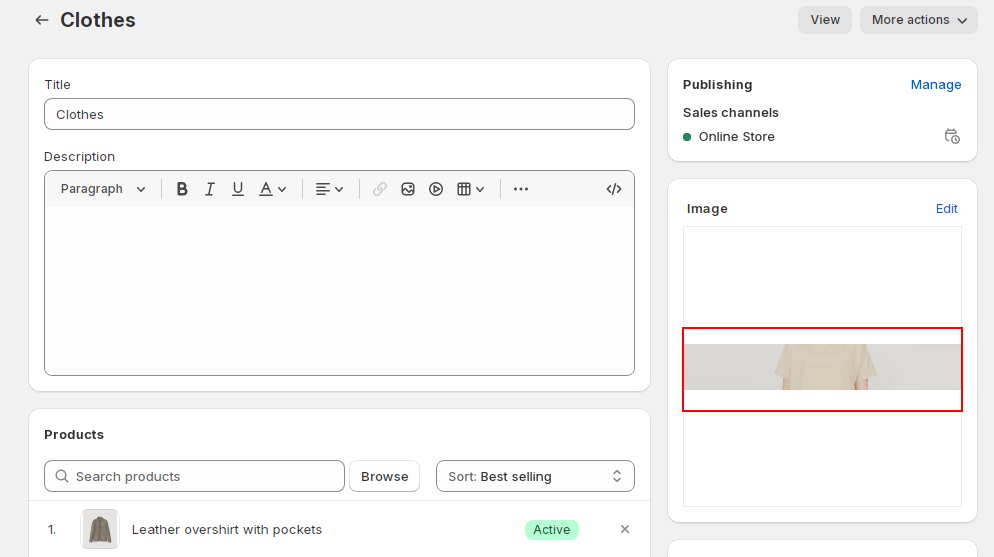
2. Upload different image for different collection: Please skip Step 01 above, don't upload an image in theme editor of Collection Image. Go to **Collection Admin** -> Upload an image at here:
| Setting | Description |
| ------------------------------------------ | --------------------------------------------------------------------------------------------------------------------- |
| Background Color | Set the background color for the section. |
| Background Gradient | Set the background gradient for the section. |
| Layout | Select the width layout of the section to be either default to the body's width, 1170px, 1770px or full screen width. |
| Spacing top - Desktop / Tablet / Mobile | Determine the spacing of the section from the top on Desktop, Tablet and Mobile. |
| Spacing bottom - Desktop / Tablet / Mobile | Determine the spacing of the section from the bottom on Desktop, Tablet and Mobile. |