> For the complete documentation index, see [llms.txt](https://templatescoder.gitbook.io/labacha-shopify-theme-documentation/llms.txt). Markdown versions of documentation pages are available by appending `.md` to page URLs; this page is available as [Markdown](https://templatescoder.gitbook.io/labacha-shopify-theme-documentation/basic-configuration/customer-registration.md).
# Customer Registration
Customer accounts let your customers log in to view their orders, profile information, and saved addresses. When a customer logs in, the details stored in their account are auto-filled during checkout for a faster checkout experience. Please read more in shopify well written detailed [**article**](https://help.shopify.com/en/manual/customers/customer-accounts)
{% hint style="success" %}
**Steps:**
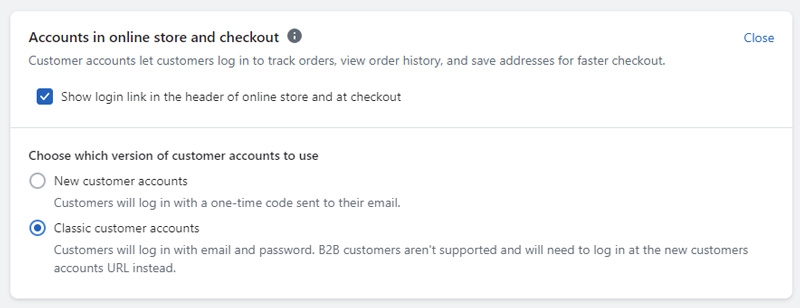
1. From your shopify store Admin -> **Click Settings** -> Locate **Customer accounts**
2. at **Accounts in online store and checkout,** click **edit**
3. choose "**Show login link in the header of online store and at checkout**"
4. click Save
{% endhint %}
{% hint style="info" %}
Shopify provides a number of options for enabling customer accounts and you can find out more about this in their help article. See Shopify [Customer Accounts guide](https://help.shopify.com/en/manual/customers/customer-accounts#set-your-customer-account-preferences) here for more details about enabling this setting on your store.
{% endhint %}